

 English (US)
 Português
 Deutsch
 English (UK)
 Español
 Français
 Italiano
 日本 (日本語)
Fiery ColorRight Package
准确呈现颜色。
Fiery ColorRight Package 是一套功能强大的工具,旨在帮助打印服务商调整和校正文件中的颜色和图像,即使他们并非颜色专家。对于需要满足客户对颜色的高要求、减少返工和浪费、并生产更多畅销印刷品的店铺来说,这是一款理想之选。

概览
Fiery® ColorRight Package, for Linux-based Fiery servers, delivers expert-level colour control with tools that ensure accurate, consistent, and vibrant results across every job. From brand colour management and soft proofing to real-time image correction and file troubleshooting, it empowers operators to hit brand colours, ensure sellable prints, and satisfy even the most demanding clients.
Key functions in the Fiery ColorRight Package include:
- Make last-minute image and colour-quality edits right in Fiery Command WorkStation
- 高级专色编辑可以准确再现品牌颜色
- 强大的软校样、色彩控制和检查工具可最大程度减少错误和浪费
Fiery ColorRight Package 可提供基于期限的许可证,从激活之日起,期限为 1 至 5 年。您可以从 Fiery 分销商处购买该许可证。
新功能
New features in Fiery Command WorkStation 7.3
Get more details here.
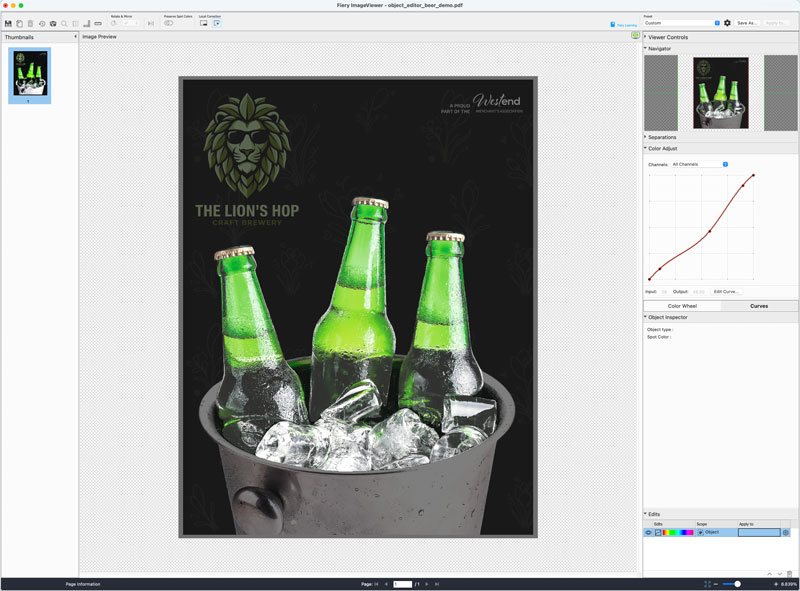
Object Editor
Requires Fiery FS800 Pro/FS800 software
Use AI-powered object detection in Fiery ImageViewer to automatically identify and isolate individual objects on a page, so you can make precise colour corrections without returning to design applications or re-RIPping files.
Learn more
Watch the video
功能
Fiery ColorRight Package 包括以下功能。

Fiery ImageViewer
以全分辨率查看和编辑光栅 (RIP) 文件。深入了解 Fiery ImageViewer。
- 调整颜色曲线,保存为预设
- 替换整个文件或选定页面上的特定颜色
- 导出软校样
- 查看 CMYK 和专用颜色的分色
- 查看并调整图像在印张上的位置

Fiery Spot Pro
强大的专色管理工具,提供准确的品牌色彩。了解有关 Fiery Spot Pro 的更多信息。
- 确保从设计到打印的一致性
- 定制专色以满足客户期望
- 实现尽可能高的专色精度
- 编辑作业中的专色
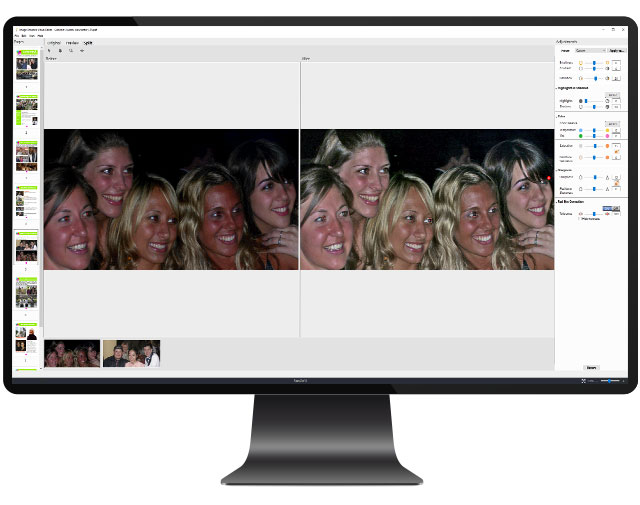
Fiery Image Enhance Visual Editor
动态校正单个图像的颜色。了解有关 Fiery Image Enhance Visual Editor 的更多信息。
- 在 Fiery Command WorkStation 中校正图像,无需返回原始设计文件
- 校正色调和颜色,在页面上锐化或平滑单个图像
- 使用屏幕预览实现自动红眼修正


Fiery Control Bar
自定义过程控制栏
- 在 Idealliance/Fogra 或自定义色条中选择
- 自定义显示的作业信息
- 页面放置灵活
- 与 Fiery Verify 一起使用,测量颜色是否符合行业标准
资源
Fiery ColorRight Package is available for Linux-based Fiery servers running FS400 or newer software. Find out more.
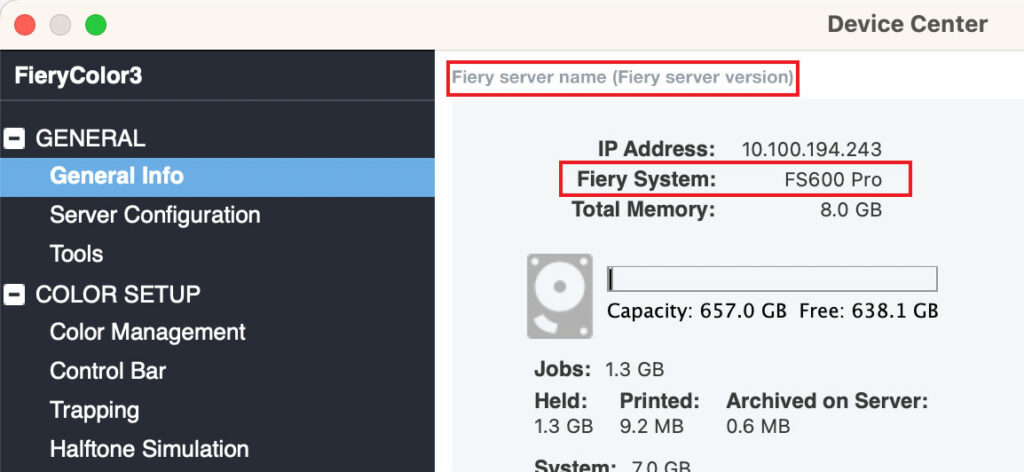
如何查看我使用的是哪个版本的 Fiery System 和 Fiery 服务器?
您的 Fiery System 版本已列在 Fiery Command WorkStation 的“设备中心基本信息”选项卡中。此外,也可以通过利用 Fiery 服务器打印的 Fiery 配置页访问该信息。
Brochures

Fiery Spot Pro 手册
Fiery Spot Pro 产品信息。 强大的专色管理工具,提供一致、准确的品牌色彩.
Datasheets

Fiery ColorRight Package 数据表
使用 Fiery ColorRight Package,您可以确信您的输出中的颜色和图像每次都能正确打印。 使用这组专业的可视化工具轻松校正颜色和图像,无需再请设计师进行修改。
Fiery Samples How-to Guides

Use tools in the Fiery ColorRight Package to easily correct color and images (仅提供英文版。)
Use the Fiery ColorRight Package to easily correct color and images in files. Check a file for errors using Fiery Postflight. Manage, import, and optimize spot colors in Fiery Spot Pro. And, make color adjustment and replacements in Fiery ImageViewer. (FS500 or newer embedded servers)
Use prepress tools at the Fiery server to adjust color and troubleshoot file issues (仅提供英文版。)
Reduce wasted prints and improve efficiency by using tools right on the Fiery server to troubleshoot files and make color adjustments
Create custom control bars for color consistency and quality control (仅提供英文版。)
Fiery Control Bar Builder has a WYSIWYG interface, which displays different color bars and job information. Each custom control bar can be used across all media sizes, reducing setup time and simplifying the operator’s job.
Enhance image quality of pictures with Fiery Image Enhance Visual Editor (仅提供英文版。)
Improve the output quality of photos with Fiery Image Enhance Visual Editor and save prepress time by eliminating lengthy image editing tasks to make photos look their best.