
 English (US)
 Português
 Deutsch
 Español
 Français
 Italiano
 日本 (日本語)
 中国大陆 (简体中文)
Fiery FS700 Pro/FS700
What’s new product guide for Fiery servers driving cutsheet presses
Introduction
The new Fiery® FS700 Pro platform powers print with confidence, control, and efficiency, helping print providers meet the demands of modern production while preparing for what’s next. FS700 Pro delivers the reliability, security, and performance you need to keep production running at its best.
Highlights include:
- Built for resilience with advanced backup, quick recovery, and faster installs
- Meets the highest standards of data protection with built-in compliance, encrypted communication, and a new Linux hardware platform
- Faster Fiery apps and simplified job submission to keep you productive, with quick restarts that minimise interruption
- Ensures predictable results with smarter imposition, precise alignment, and intelligent scheduling for complex jobs
- Achieves standout results with enhanced specialty colour sharing, refined image quality for black & white presses, and the latest Adobe PDF Print Engine and PANTONE libraries
- Simplifies control and collaboration with seamless cloud integration for modern, connected workflows
As your trusted partner in digital print innovation, Fiery empowers you to run stronger, print smarter, and move forward with total confidence, backed by the proven technology and expertise that keeps your business thriving.
Platform differences
Fiery FS700 Pro is available for Windows-based servers (NX Series), and Fiery FS700 is available for Linux-based servers (E-series or LX Pro). The term Fiery FS700 Pro is also used as a general reference to the software at a system level.
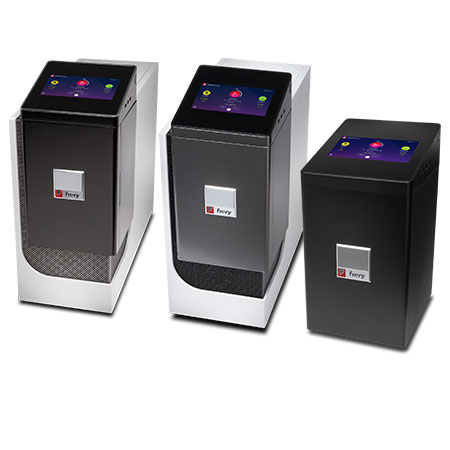 | 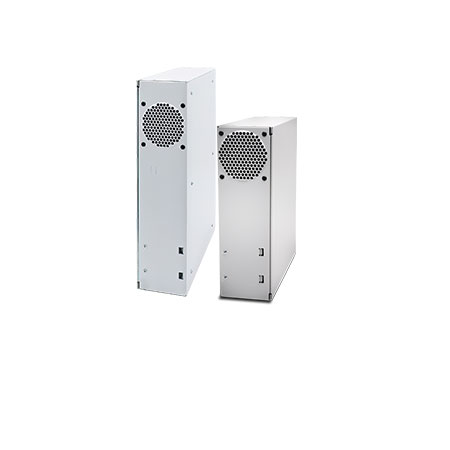 |
Windows-based servers (NX Series) run Fiery FS700 Pro system software | Linux-based servers (LX Pro, E-Series) run Fiery FS700 system software |
Availability
Each feature indicates its availability on a specific platform (Windows-based or Linux-based), and if it is standard or optional.
Availability | Definition |
Standard | Available by default |
Optional | Requires a paid license to enable |
N/A | Not available |
Check Fiery server materials to confirm support | Available on a product-specific basis. Confirm availability in the respective datasheet or feature matrix. |
New features by innovation area
Reliable | Secure | ||
|
| ||
Productivity | Management | Colour & Imaging | Connection |
|
|
|
|
* Only available on Linux-based servers
** Only available on Windows-based servers
Note: Features may vary by printer model. Please refer to the individual product datasheet or feature matrix to find out exactly which features are available.
Stay up to date
Visit the Fiery Command WorkStation page to discover the newest features, download the latest version, and stay informed on updates that help you keep your production environment optimized.
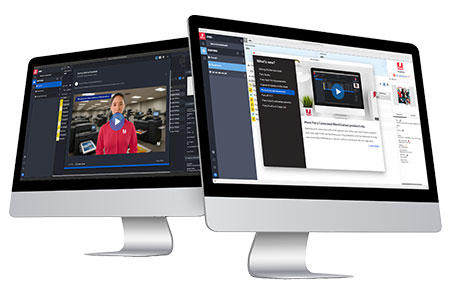
Reliable
The Fiery FS700 Pro platform provides the reliability you need to keep printing.
 |  |
Maximise production | Minimise downtime |
Stay up and running with faster, less disruptive updates and improved serviceability for Fiery partners. | Recover quickly from service disruptions with advanced backup and restore capabilities that minimise downtime and keep production running smoothly. |
Fiery Quick Recovery
Fiery Quick Recovery is a built-in troubleshooting tool for Fiery Service Technicians designed to resolve issues without requiring a full software reinstallation, a process that can otherwise take several unnecessary hours.
It guides technicians through essential cleanup and recovery steps while automatically capturing diagnostic logs, even if the Fiery DFE is unresponsive or busy.
This enables faster restoration of operation and provides Fiery engineering with accurate data for quicker issue diagnosis.
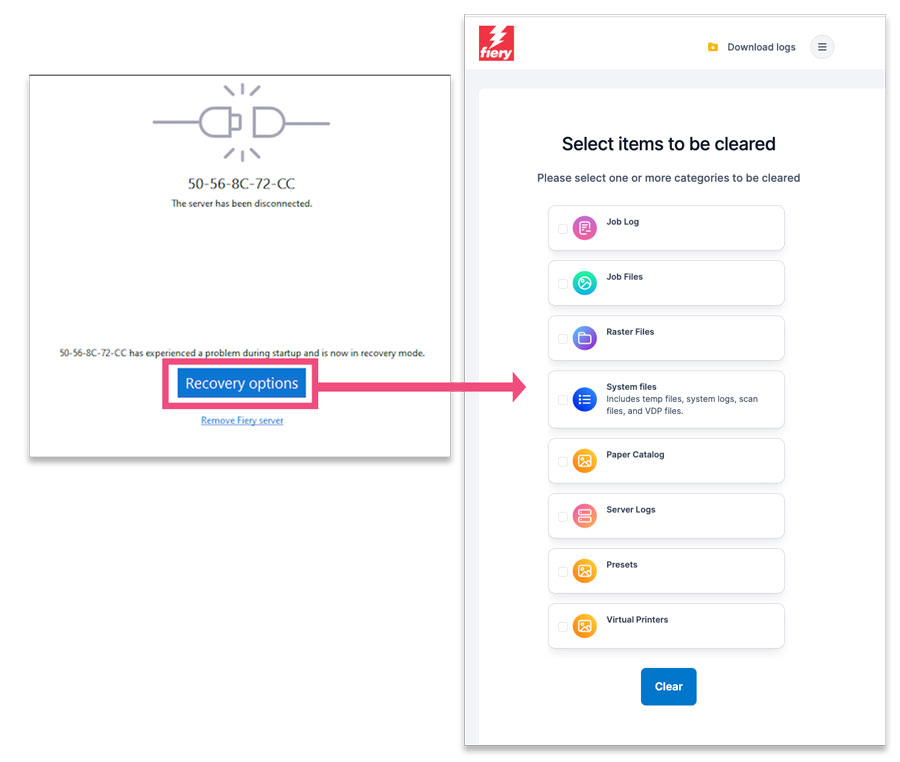
Why this matters:
When a Fiery DFE becomes unresponsive, collecting logs and restoring operation can be sometimes difficult and time-consuming. Fiery Quick Recovery is available to technicians when Fiery Auto Recovery cannot automatically recover the DFE.
It streamlines troubleshooting by guiding technicians through essential cleanup and recovery steps while automatically capturing diagnostic logs, even if the DFE is unresponsive or busy.
This approach saves hours of downtime, keeps production running, and provides Fiery engineering with accurate diagnostic data for faster root-cause analysis.
Availability:
Windows-based servers | Standard |
Linux-based servers | Standard |
Faster install and update of Fiery software
Fiery FS700 Pro introduces significant improvements to the installation and update process for Fiery software. Thanks to hardware upgrades and redesigned applications, service technicians can now complete installations and updates much more quickly and efficiently.
In most cases, service technicians can expect the following:
Boot time: less than 60 seconds
Restart time: less than 20 seconds
Fiery system software installation time: less than 30 minutes
Why this matters:
Whether you’re operating the press or servicing it, quicker installs and restarts mean lower service costs, faster service, less downtime and more uptime.
Availability:
Windows-based servers | Standard |
Linux-based servers | Standard |
Debian 12 Linux
Debian 12 Linux is the new operating system foundation for embedded or bustled Fiery servers, providing a modern, secure, and stable platform built on open-source technology.
It delivers long-term support, enhanced system security, and improved performance for Fiery workflows.
Why this matters:
This upgrade ensures compatibility with the latest hardware, libraries, and security standards, while maintaining full reliability and performance for Fiery production environments.
Availability:
Windows-based servers | Not available |
Linux-based servers | Standard |
Support of customer-supplied Windows 11 operating systems
Microsoft Windows 10 IoT Enterprise 2021 LTSC is included by default on Fiery FS700 Pro servers and is supported long term.
For organisations that have standardised on Windows 11, customers can gain flexibility and enterprise-level consistency by deploying Fiery DFEs with the organization’s Windows 11 Enterprise image. This approach ensures the Fiery DFE is in compliance with evolving security standards like FIPS 140-3 and TLS 1.3.
It also enables customers to use their approved security tools, group policies, and remote management across their IT environment while maintaining Fiery’s trusted performance, color accuracy, and reliability.
This deployment path requires prior approval from the printer manufacturer and must be implemented through Fiery Professional Services to guarantee a successful implementation.
Why this matters:
Many enterprises standardise their environments around specific OS versions or images.
Allowing customers to use their own Windows 11 Enterprise licenses provides easier integration into corporate IT frameworks, simplifies maintenance, and strengthens compliance with internal security requirements — all while keeping the trusted Fiery experience intact.
Availability:
Windows-based servers | Standard |
Linux-based servers | Not available |
More comprehensive backup options
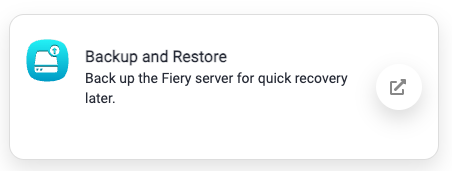
Fiery FS700 Pro introduces expanded Backup and Restore capabilities, giving print providers faster, more convenient recovery when unexpected issues occur. With more comprehensive backups of system settings, Hot Folders, workflows, and resources, users can quickly return to full production with minimal downtime.
Expanded Backup and Restore coverage on the Fiery server
Backup and Restore now includes a wider range of Fiery settings and resources, enabling more complete protection of your production environment.
These items can be included in a server-level backup:
- Fiery System Settings
- Color Settings
- Preflight Presets
- Scan Settings
- FreeForm/VDP Resources
- Paper Catalog
- Virtual Printers
- Server Presets
- Fonts
- Job Log
New with Fiery FS700 Pro:
- Job Tags (included with Fiery System Settings)
- JobFlow workflows and resources (Windows-based servers only)
Backup and Restore on the Fiery server can be accessed from Fiery Command WorkStation, WebTools, and Fiery QuickTouch.
More Backup and Restore settings in your Fiery Account
Cloud-based backup options in Fiery IQ help consolidate critical resources and make them accessible anytime through your Fiery Account. Users can back up license information and production assets for even greater resilience.
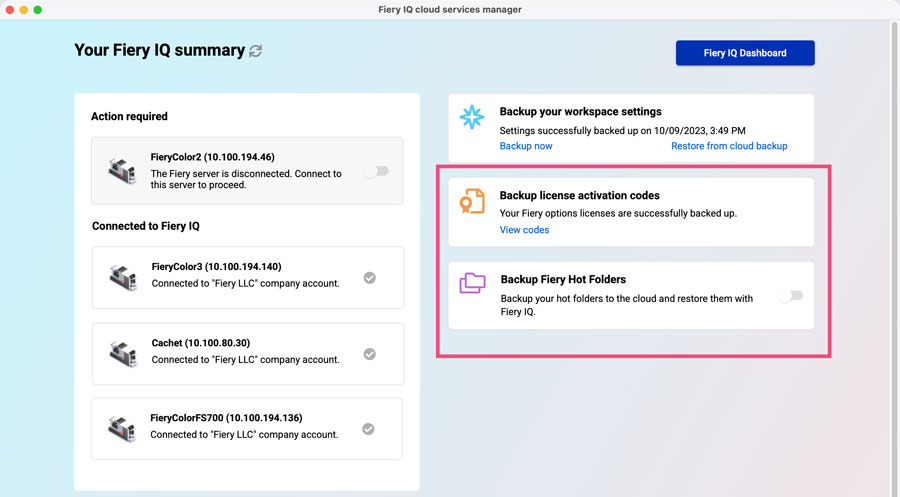
Previously, users could back up Fiery Impose, Compose, and JobMaster licenses in a Fiery Account.
Now, users can also back up the following server-based licenses:
Note that Fiery IQ cloud backup requires the Fiery Account to be associated with a company. For more information on Fiery Accounts, visit the webpage or take the eLearning course for step-by-step explanations.
These enhancements give organsations stronger protection against data loss and streamlined recovery, ensuring production teams can get back up and running quickly, no matter what happens.
Why this matters:
Stronger, more complete backup coverage means you can recover quickly, preserve critical production settings, and keep jobs moving with minimal disruption.
Availability:
Windows-based servers | Standard |
Linux-based servers | Standard |
Secure
The Fiery FS700 Pro platform provides the robust security modern print environments require, with secure hardware options, end-to-end safeguards from startup to shutdown, compliance with the latest cybersecurity standards, and support for high-security and public-sector needs.
For complete information, download the Fiery FS700 Pro security white paper.
Compliance with NIST 800-52 standard
Fiery DFEs comply with the NIST 800-52 standard, which defines best practices for configuring Transport Layer Security (TLS) to protect data transmitted over networks. This means all communication between Fiery systems and connected devices uses only approved TLS 1.2 and 1.3 encryption protocols.
Sensitive information, such as job files, credentials, and customer data is safeguarded against interception or tampering, ensuring confidentiality and integrity at every step.
Why this matters:
Security is critical in every print environment. By meeting the NIST 800-52 standard, Fiery DFEs follow the same encryption practices required by U.S. government agencies and leading enterprises across the world, giving you confidence that your data is protected at all times.
Availability:
Windows-based servers | Standard |
Linux-based servers | Standard |
AES Support for SNMPv3 Communications
We’ve enhanced product security by integrating Advanced Encryption Standard (AES) support for SNMPv3 communications. This upgrade ensures more secure, encrypted data exchanges, providing an added layer of protection for sensitive information.
Why this matters:
By using encrypted, authenticated communication, organizations can maintain centralised printer monitoring and diagnostics while fully meeting modern security and compliance requirements.
Availability:
Windows-based servers | Standard |
Linux-based servers | Standard |
Secure boot
Secure Boot is a security feature that ensures a Fiery DFE starts up only with verified, trusted software.
During startup, the system checks that all core components — including firmware, the operating system, and drivers — are digitally signed and have not been tampered with.
This prevents malicious or unauthorised code from running, protecting the system from threats right from power-on.
Secure boot is disabled by default and can be enabled by a Fiery service technician at the firmware level using the Aptio Setup Utility.
Why this matters:
Secure Boot safeguards the Fiery environment at its foundation. By verifying the integrity of every component before the system loads, it helps prevent malware infections and unauthorised changes that could compromise performance or data security.
It’s an essential layer of defense that keeps Fiery DFEs stable and trustworthy from the moment they start.
Availability:
Windows-based servers | Standard |
Linux-based servers | Not available |
Security updates
Fiery DFEs now feature upgraded security modules designed to meet modern encryption and communication standards, ensuring stronger compliance and protection.
These updates enhance data protection across the Fiery platform, ensuring compliance with the latest enterprise and government-grade security standards.
Enhancements include:
- TLS 1.3 encryption: All communications with the Fiery DFE can now be encrypted using TLS 1.3 for stronger protection and more secure data transfer. (Remote Desktop (RDC) communications with Windows DFEs still support TLS 1.2)
- Modern IPsec tools: Upgraded Linux DFEs now include updated IPsec implementations to support the most current network security standards and industry compliance requirements.
- AES Support for SNMPv3 Communications: This upgrade ensures more secure, encrypted data exchanges, providing an added layer of protection for sensitive information.
- Deprecated ‘Print via email’: The legacy feature was removed due to limited use and potential security vulnerabilities, ensuring a safer system environment.
Why this matters:
Protecting sensitive data and meeting compliance standards are critical in today’s connected print environments.
With these updates, Fiery DFEs implement the latest encryption standards and security protocols, reducing exposure to potential threats while ensuring alignment with enterprise and government IT policies.
The result: every Fiery system stays secure, reliable, and ready for modern workflows, giving you confidence that your business and customer information is protected at all times.
Availability:
Windows-based servers | Standard |
Linux-based servers | Standard |
New Linux hardware platform
The Fiery LX Pro is a purpose-built Fiery hardware platform running Linux OS, designed for organisations that prioritize low maintenance and stability over frequent security updates, and need advanced capabilities, such as CMYK+ printing. It’s ideal for environments where simplicity, reliability, and reduced administrative overhead are key.
LX Pro specifications include:
- Debian 12 Linux operating system
- Intel i3-12100 Processor
- 16 GB RAM memory
- 1 TB NVMe SSD
- 2 USB 3.2 ports, 2 USB 2.0 ports
- Dimensions: 11” (279.4 mm) x 14.75” (374.65 mm) x 3.56” (90.42 mm)
- Supports CMYK+ printing
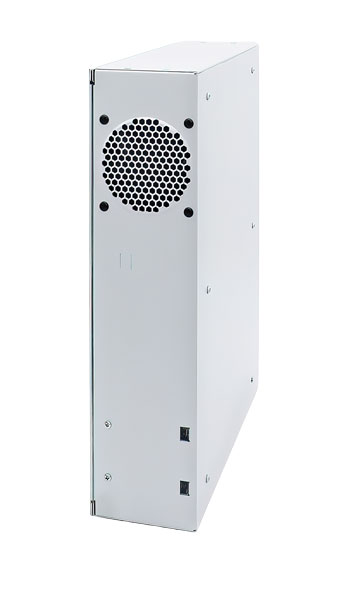
The LX Pro is available for specific Fiery Driven presses.
Why this matters:
Organisations with limited IT resources or strict uptime requirements need solutions that minimise complexity and reduce administrative burden.
A purpose-built Fiery hardware platform running Linux delivers exceptional stability and low maintenance, ensuring predictable performance without the overhead of frequent security patching, and supports advanced capabilities, like CMYK+ printing.
This approach simplifies operations, lowers total cost of ownership, and provides peace of mind for environments where reliability and ease of use are critical.
Availability:
Windows-based servers | Not available. |
Linux-based servers | Check Fiery server materials to confirm support |
Productivity
Work smarter and keep production flowing
Built to keep operators moving, Fiery FS700 Pro cuts prep time with AI-assisted job setup tools, speeds routine tasks, and ensures quick recovery after updates so teams can stay focused on delivering work without delays.
Fiery Scribe
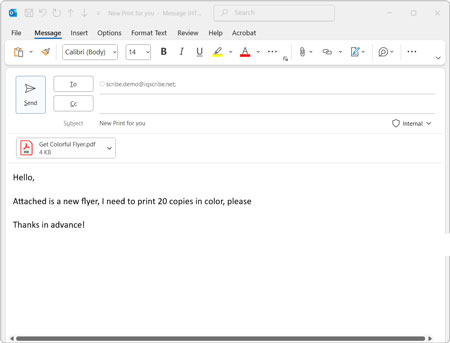
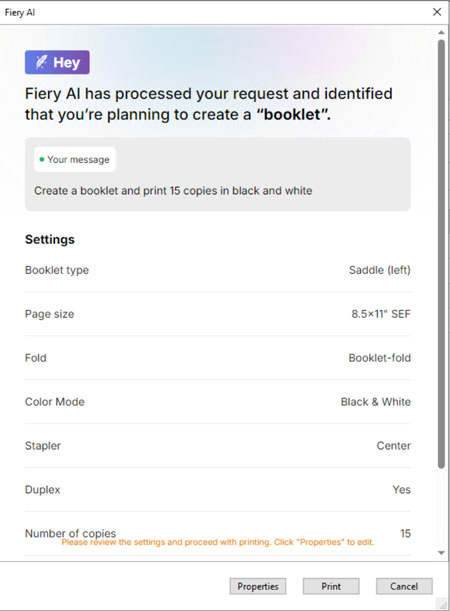
Fiery Scribe is an AI-powered automation tool that streamlines job intake by reading and interpreting print requests sent via email.
It extracts key job details, such as quantity, media type, duplexing, and colour settings, and applies the correct Fiery Job Properties without operator input.
The attached PDF is imported directly into Fiery Command WorkStation (version 7.2 and later), appearing in the Held queue ready for review or immediate production.
Operators can fine-tune settings if needed, and Fiery Scribe learns from these adjustments to improve accuracy and efficiency over time.
It integrates seamlessly with both Fiery IQ, for centralised monitoring and analytics, and Command WorkStation, providing a complete, connected workflow from inbox to press.
At launch, Fiery Scribe is only available in English.
Why this matters:
Manual job setup takes time and increases the chance of errors.
By automating the process, Fiery Scribe shortens turnaround times, standardises output quality, and reduces rework.
It helps print providers handle more jobs per day, maintain consistency across operators, and deliver faster, more reliable results to customers.
Availability:
Windows-based servers | Optional for select servers |
Linux-based servers | Optional for select servers |
Fiery JobFlow Pro
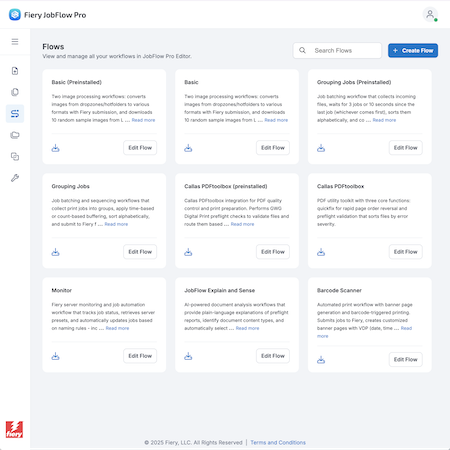
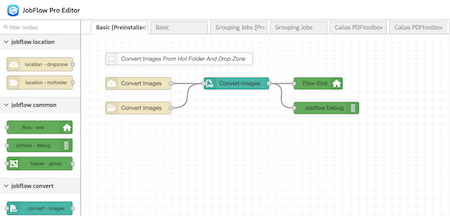
Fiery JobFlow Pro is an AI-assisted workflow automation platform designed for modern, high-volume production environments. It enables print providers to automate complex job preparation tasks and reduce manual touchpoints across the entire workflow.
Unlike traditional rule-based automation, JobFlow Pro uses event-driven logic and content-aware AI processing to automatically analyse, route, preflight, fix, and prepare jobs for print based on job context. This allows more jobs to move through production with minimal operator intervention and fewer errors.
Operators can easily create and modify workflows using an intuitive drag-and-drop editor, no scripting required. Workflows can be triggered by hot folders, drop zones, Fiery server activity, barcode scans, sensors, or even other workflows. With seamless integration with Fiery DFEs, finishing equipment, and smart production systems, JobFlow Pro enables true end-to-end automation and keeps production running smoothly.
Why this matters:
By automating job setup and eliminating repetitive manual steps, JobFlow Pro helps print providers increase throughput, improve consistency, and handle higher job volumes—without adding staff.
Availability:
Windows-based servers | Optional |
Linux-based servers | Optional, requires Fiery Automation Package |
Faster and fewer reboots
Many configuration changes can now be applied with a quick software restart rather than a full system reboot. This improvement dramatically shortens the time required for routine tasks such as installing or updating software, while keeping the Fiery server available for production.
 |  |
A full reboot, common on earlier platforms, shuts down the entire system, restarts the operating system, and forces the Fiery server to reconnect to the press, a process that typically takes one minute or more. | On Fiery FS700 Pro systems, restarts are now significantly faster, in most cases under 20 seconds. During the process, the operating system and press connection remain active, only the Fiery software components restart, so production continues without interruption and recovery is quicker than ever. |
This streamlined approach reduces interruptions, accelerates recovery, and enhances overall serviceability and usability, benefiting both technicians and operators.
Why this matters:
Faster restarts keep production moving, reducing downtime and making routine updates far less disruptive.
Availability:
Windows-based servers | Standard |
Linux-based servers | Standard |
Faster response time for Fiery apps
Enhancements in Fiery hardware and software deliver a noticeably faster and more responsive experience across key server-based Fiery applications. Systems benefit from significantly improved load times, smoother navigation, and quicker interaction with tools used throughout the production workflow.
Applications such as Fiery Spot Pro, Paper Catalog, Fiery ImageViewer, and Fiery JobFlow open faster and perform operations more efficiently, helping operators move through tasks with less waiting and greater confidence.
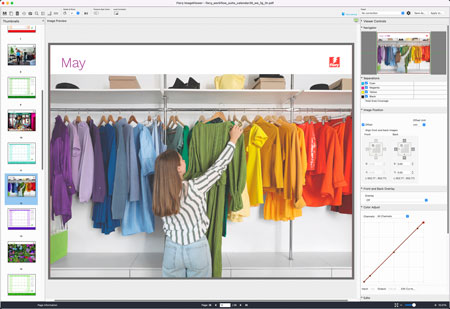
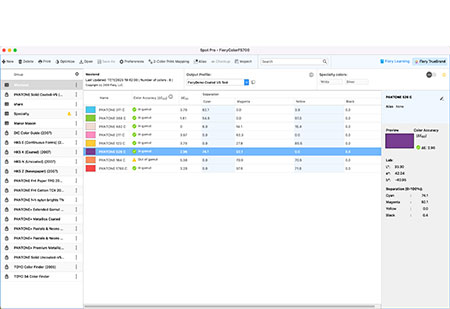
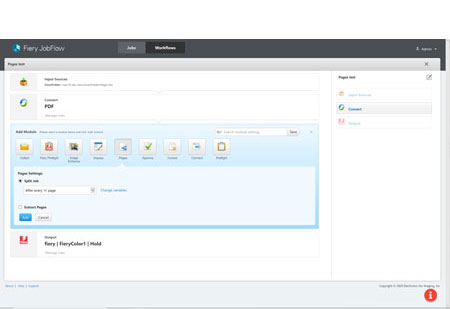
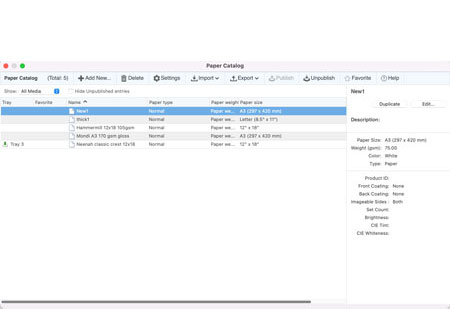
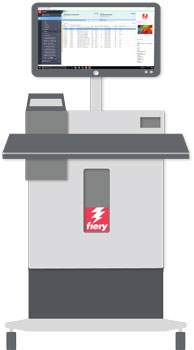
When Fiery applications such as Fiery Command WorkStation or Fiery Impose are run from an NX Server with the NX Station as a central workspace, users also experience improved responsiveness that supports faster job setup and streamlined daily operations.
Why this matters:
Faster, more responsive Fiery applications help operators work more efficiently, reduce wait times, and keep production running smoothly.
Availability:
Windows-based servers | Standard |
Linux-based servers | Standard (NX Station not supported) |
Pause Printing
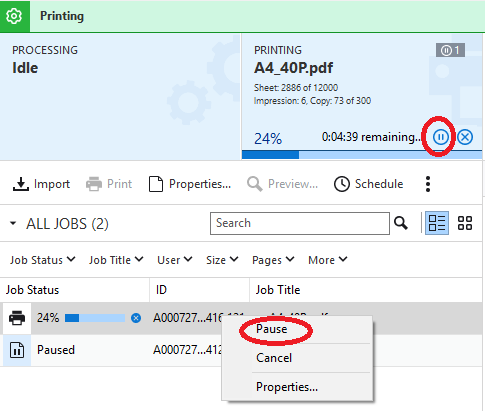
Pause Printing gives operators greater control over when to stop and resume a currently printing job. This is especially useful during long production runs or at the end of a shift: the operator can pause the job, allow the current finishing set to complete, and resume printing later exactly where it left off. While the job is paused, other queued jobs continue printing normally, giving operators more flexibility to prioritize work without cancelling or rearranging jobs.
With Pause Printing, operators can:
- Pause and resume the active job at any time
- Let the current finishing set complete before pausing
- Continue printing other jobs while one job is paused
- Restart the paused job exactly where it stopped
- Manage long or multi-set jobs more easily during shift changes
How Pause Printing differs from existing options
Compared to Rush Print
Rush Print is designed to print a specific job immediately by interrupting the job currently printing. Once the urgent job finishes, the original job resumes automatically. Pause Printing works differently: it intentionally places the active job on hold for as long as needed – whether hundreds or thousands of copies remain – without requiring other jobs to be marked as “rush.”
Compared to Suspend/Resume
Suspend/Resume stops all jobs from being sent to the engine and is used when the operator needs to halt every print activity. Pause Printing affects only the job currently printing, keeping all other jobs and workflows running normally.
Why this matters:
Pause Printing provides operators with far more flexibility to manage long jobs and shifting priorities without stopping the entire press or disrupting overall production.
Availability:
Windows-based servers | Check Fiery server materials to confirm support |
Linux-based servers | Check Fiery server materials to confirm support |
Configurable maximum Job Log entries
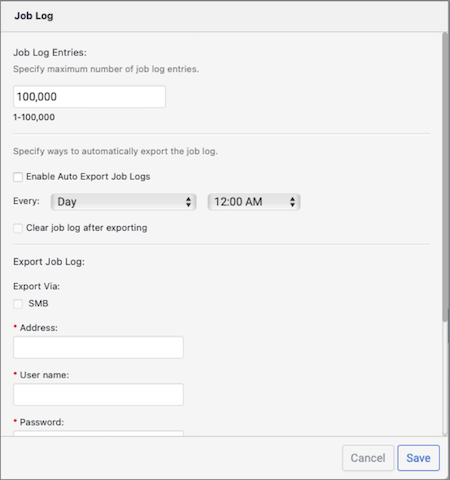
Fiery FS700 Pro allows administrators to define the maximum number of Job Log entries stored on each server, helping prevent slowdowns that can occur when logs become excessively large. This setting is configured per server in WebTools and provides full control over how much historical data is retained.
Administrators can set the Job Log capacity anywhere from 1 to 100,000 entries, with 100,000 as the default. When the specified limit is reached, the oldest entries are automatically deleted to maintain optimal performance. This ensures operators can continue to access and search the Job Log without delay, even in environments with high job volumes.
Why this matters:
By preventing oversized logs from affecting Fiery system responsiveness, customers can maintain fast access to job history while keeping their server performing at its best.
Availability:
Windows-based servers | Standard |
Linux-based servers | Standard |
Management
Quicker, more efficient makeready
Fiery FS700 Pro streamlines setup so operators can move from job intake to print with fewer steps. Smarter VDP setup, improved scheduling for complex jobs, and tools that reduce reprints all work together to shorten makeready and keep production flowing.

VDP imposition enhancements
New enhancements to VDP imposition give operators greater control, more predictable results, and a faster, more responsive setup experience in Fiery Impose.
These improvements apply to both PDF/VT and Fiery FreeForm Plus (output from Fiery FreeForm Create) files.
User-defined finish size for VDP imposition
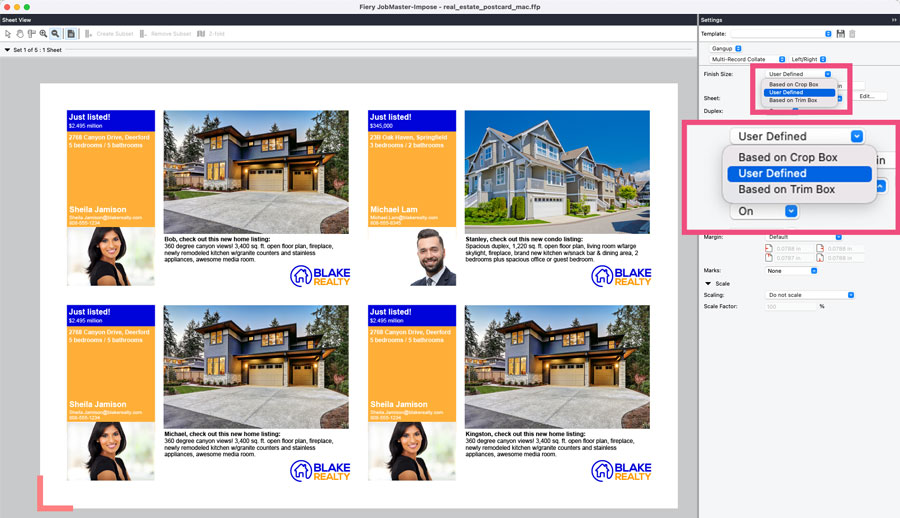
Previously, Fiery Impose relied on the PDF crop box to determine the finish size for VDP jobs, which often didn’t match the operator’s intended output. With the new user-defined finish size option for PDF/VT and FreeForm Plus files, operators can set the exact finish size using the trim size defined in the original content.
Once the finish size is specified, Fiery Impose automatically centers the page content, applies the appropriate bleed, and positions trim marks correctly. For VDP jobs where individual pages may have different crop or trim dimensions, selecting a user-defined finish size ensures Fiery Impose consistently uses the trim size embedded in the file, resulting in more predictable and consistent VDP output.
Faster previews of imposed jobs
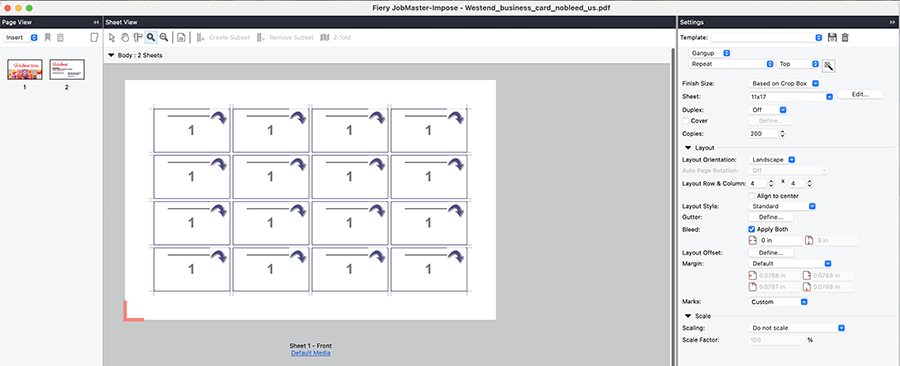
Previews for imposed VDP jobs now load significantly faster. Previously, Fiery Impose required all records to RIP before generating a preview, which slowed down setup for complex PDF/VT and FreeForm Plus jobs.
With FS700 Pro, imposed files open immediately in a wireframe view, and full-content previews loads much more quickly when requested. This reduces waiting time and improves operator efficiency, particularly for VDP jobs with large data sets.
Why this matters:
These enhancements give operators more precise control and faster feedback during VDP setup, leading to more accurate output, greater confidence in imposed layouts, and improved overall productivity.
Availability:
Windows-based servers | Optional (requires Fiery Impose) |
Linux-based servers | Optional (requires Fiery Impose). PDF/VT support requires Fiery JobExpert & PDF Processing Kit. |
Job Group support in Fiery Print Scheduler
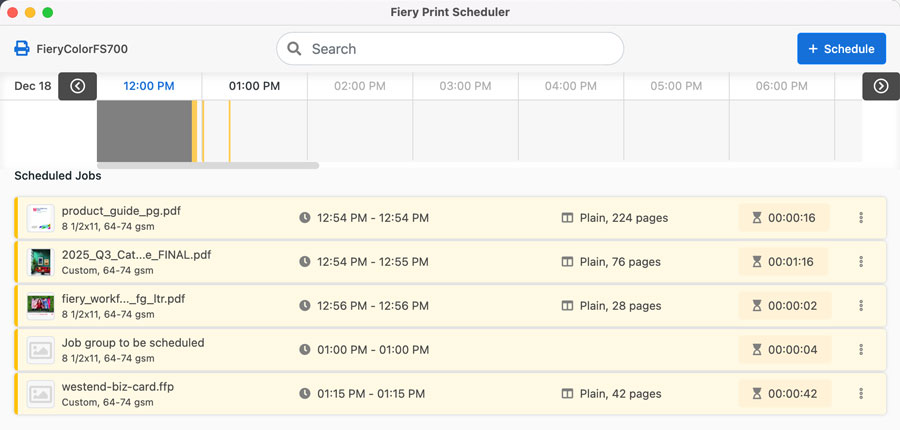
Fiery Print Scheduler provides a simple visual interface that lets operators plan and schedule jobs within a 24-hour window, ensuring production aligns with equipment availability, shift schedules, and delivery timelines. The schedule automatically updates if job details change, keeping production timing accurate and predictable.
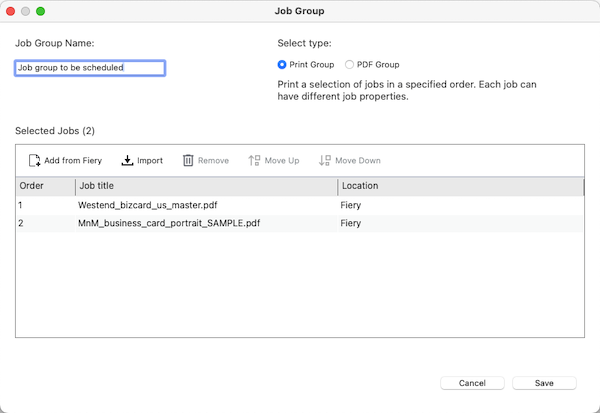
With FS700 Pro, Fiery Print Scheduler now supports Job Groups, allowing multiple jobs to be handled and scheduled as a single item. Job Groups can be created as either a Print Group, which prints jobs in a specific order, or a PDF Group, which combines jobs for use in Fiery Impose, Compose, or JobMaster (license required). Operators can add, remove, or reorder jobs within a group and apply properties to the group as needed.
Why this matters:
Scheduling Job Groups helps keep multi-file workflows together, ensures jobs print or finish in the correct sequence, and reduces manual coordination, making daily production planning more efficient and reliable.
Availability:
Windows-based servers | Standard Requires a license if PDF Groups are used with Fiery Impose, Compose, or JobMaster |
Linux-based servers | Standard Requires a license if PDF Groups are used with Fiery Impose, Compose, or JobMaster |
Tray alignment for custom sizes
Tray alignment enhancements give operators full control over image placement on custom media sizes. This allows precise adjustment of how a job is positioned on the sheet, ensuring accurate front-to-back alignment for both simplex and duplex jobs – regardless of the media’s dimensions.
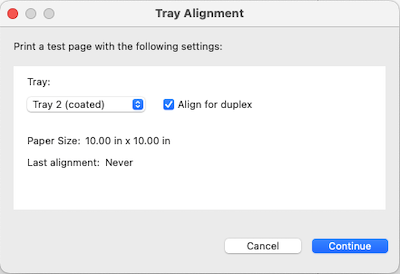
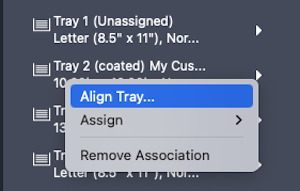
Tray alignment can now be accessed directly from the tray in the server pane, making it faster and easier to print alignment pages and fine-tune positioning without navigating through multiple menus. Operators can adjust alignment per tray, ensuring consistent results across a wide range of custom media types.
Why this matters:
More accurate tray alignment reduces setup time, minimises reprints, and delivers consistently predictable output when working with custom media.
Availability:
Windows-based servers | Standard |
Linux-based servers | Standard |
Improved font handling
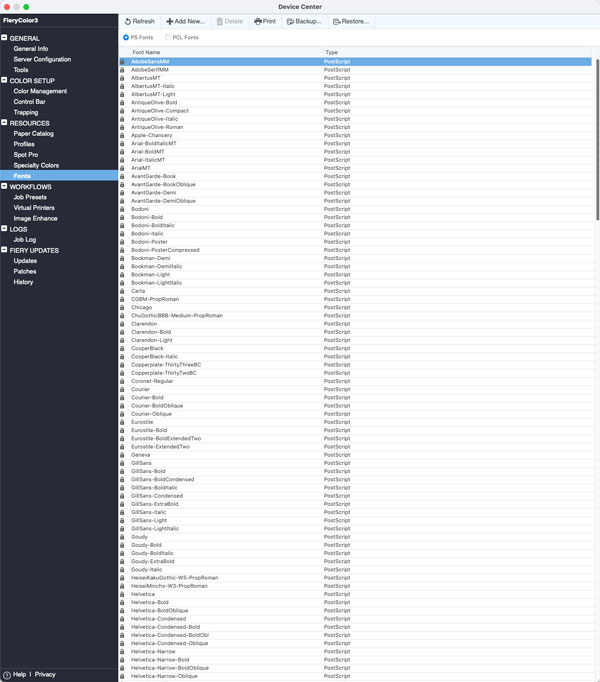
The Fiery server now automatically recognizes all fonts installed on a connected Windows system – including Windows system fonts – and makes them available to print jobs without requiring any manual upload. Previously, operators had to manually install or upload fonts to ensure accurate output, which introduced extra steps and could lead to jobs printing incorrectly if fonts were missing or mismatched.
This enhancement eliminates the need for manual font management when using Windows-based servers, reducing operator confusion and helping ensure consistent, reliable output.
Why this matters:
Automatic font handling reduces errors and simplifies job setup by removing the need to manually upload fonts.
Availability:
Windows-based servers | Standard |
Linux-based servers | Not available |
Colour & Imaging
Elevated colour for every press
No matter whether you print to a colour or monochrome press, Fiery provides the tools you need to deliver accurate, modern, and consistent output. With the latest colour and imaging standards, faster specialty colour setup across like devices, and consistent controls to fine-tune jobs for both colour and black & white engines, operators can produce standout results with less effort and greater confidence.

Adobe PDF Print Engine 6.2
The inclusion of the latest Adobe® PDF Print Engine ensures alignment with the most recent Adobe PDF standards and creative application updates.

This version provides the foundation for accurate rendering, colour consistency, and reliable processing of complex PDF files, maintaining the trusted performance expected from Fiery Driven workflows.
Learn more about this technology on the Adobe PDF Print engine web page.
Why this matters:
Keeping the Fiery platform current with Adobe’s latest PDF Print Engine ensures continued compatibility with modern design tools and evolving PDF specifications.
Availability:
Windows-based servers | Standard |
Linux-based servers | Optional (requires Fiery JobExpert & PDF Processing Kit) |
Latest PANTONE libraries
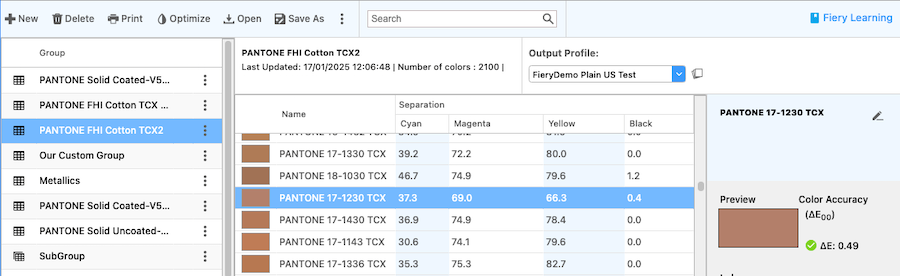
Fiery FS700 Pro servers include the latest PANTONE FASHION, HOME + INTERIORS (FHI) 2024 colour libraries. These updated libraries ensure designers and print providers have access to the newest PANTONE standards directly within their Fiery workflow, enabling accurate colour communication and consistent reproduction of trend-driven palettes.
Why this matters:
Built-in access to the latest PANTONE libraries helps ensure brand-accurate, up-to-date colour reproduction without requiring manual downloads or updates.
Availability:
Windows-based servers | Standard |
Linux-based servers | Standard |
Share spot colour libraries with specialty colours
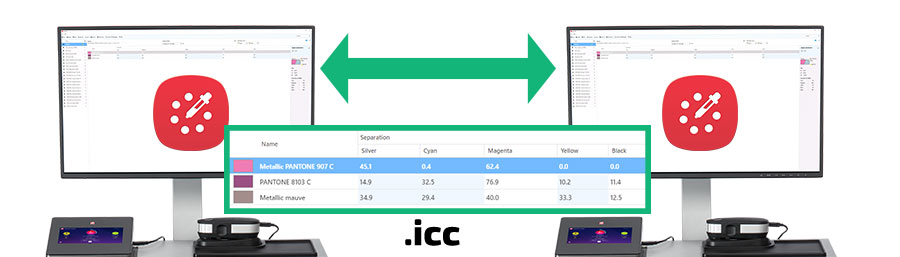
Fiery FS700 Pro adds improved support for sharing spot colour libraries that include specialty colour values. Operators can configure a specialty colour library in Fiery Spot Pro on one Fiery server and export it in .icc format for use on another like Fiery server.
When imported, the specialty colour values, such as gold or silver, are preserved and displayed correctly in Fiery Spot Pro, provided the receiving server also supports those specific specialty colours.
This enhancement ensures that spot colour groups containing specialty colour definitions maintain their values across servers, enabling consistent colour reproduction without requiring manual recreation of specialty colour values.
Sharing specialty colour libraries requires both Fiery servers to use the same Fiery system software and version on the same press, with Fiery Spot Pro installed on each. In addition, ensure that specialty colours are enabled for the spot colours in Spot Pro.
Why this matters:
Being able to export and share specialty colour libraries preserves precise colour definitions across Fiery servers, ensuring consistent, predictable specialty colour output and reducing setup time for multi-device environments
Availability:
Windows-based servers | Check Fiery server materials to confirm support Fiery Spot Pro requires Fiery Graphic Arts Pro Package |
Linux-based servers | Check Fiery server materials to confirm support Fiery Spot Pro requires Fiery ColorRight Package |
New ImageViewer features for black and white servers
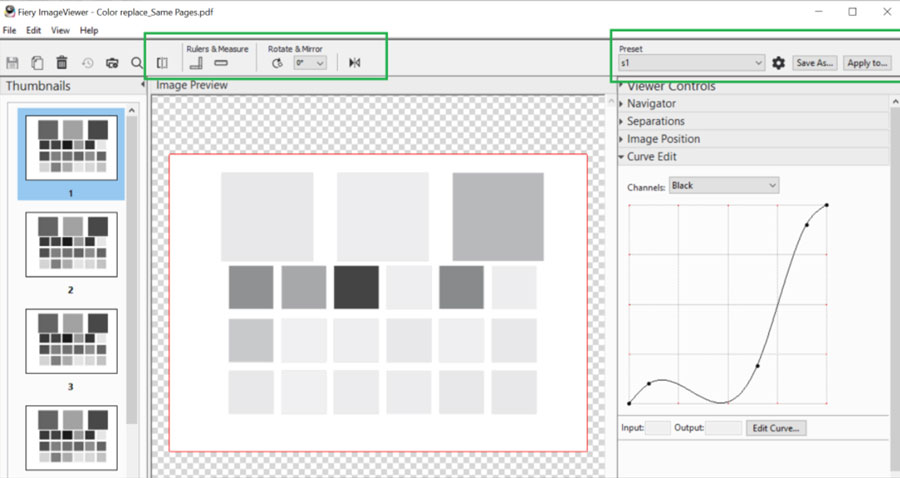
A new version of Fiery ImageViewer is now available for black-and-white Fiery servers, bringing closer feature parity with the ImageViewer version used on colour servers.
Operators can now take advantage of familiar tools to inspect, verify, and fine-tune output, including:
- Ruler/measure tools: confirm correct placement of elements on a page, such as finishing marks
- Wiper: shows side-by-side views of edits in real time
- Visual image shift: a visual way to adjust image placement on front and/or back of a sheet
- Proof print: send a copy of the job to the press
- View imageable area: ensure content stays within the printable bound of a sheet
These capabilities make it easier to identify issues, confirm placement, and ensure final output quality before printing.
Why this matters:
Enhanced ImageViewer tools give monochrome workflows a similar level of control to colour workflows, improving confidence and reducing reprints.
Availability:
Windows-based servers | Optional for black and white servers |
Linux-based servers | Optional for black and white servers |
Connection
Paper Cut Hive/Pocket compatibility
Fiery DFEs now integrate seamlessly with PaperCut Hive and PaperCut Pocket, enabling secure, cloud-based print management.
Tested workflows include printing from Windows, macOS, iOS, Android, Chromebook, and iPadOS devices. Secure job release is supported via List, QR Code, and Release Code methods, ensuring flexibility and security for modern print environments.


Why this matters:
As businesses move toward cloud-first infrastructures, this compatibility ensures Fiery DFEs remain easy to manage, secure, and adaptable.
It enables organisations to centralise print control and cost tracking in the cloud, simplify user access, and maintain the same trusted Fiery output quality, no matter where teams are working.
Availability:
Windows-based servers | Standard |
Linux-based servers | Standard |
Modified and removed functions
Improved behavior when using Impose templates on unlicensed clients
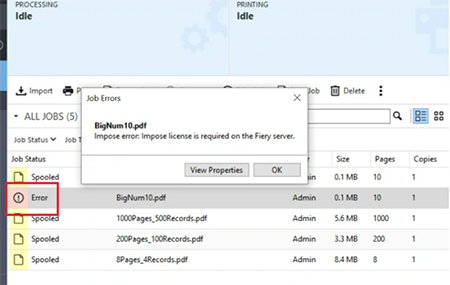
When an Impose template is applied through a Hot Folder running on a client system without an active Impose license, Fiery FS700 Pro now stops the job before it reaches the server and provides a clear error message to the user.
Previously, the job would print with a demo watermark and no explanation, leading to wasted media and unnecessary troubleshooting. Now, the job intentionally errors out before printing, and the user will see a message indicating that an Impose license is required on that client.
This prevents unintended output, reduces production waste, and helps users understand what they need to do to resolve the issue.
Removed features
Several legacy features have been removed to streamline the Fiery workflow, improve security, and focus development on the tools that deliver more value to users.
Print/Scan via email: Removed due to low usage and frequent security vulnerabilities
VDP Resource Manager: Primarily used for PPML workflows, which are now used less frequently. Most VDP jobs today use PDF/VT.
Halftone simulation: Equivalent functionality is already available within Fiery ImageViewer
Fiery Learning
Free learning resources
Fiery Learning delivers educational resources that best fit your needs, using a variety of free, self-paced, web-based courses; videos; or hands-on, practical guides that make it easy to fit training into busy a schedule.
- eLearning courses: interactive online learning sessions
- Simulation learning: learning solution that offers the opportunity to practice techniques and procedures in a realistic, immersive environment
- Express videos: short videos on key topics, delivered by Fiery subject-matter experts
- Webinars: access to recordings of World of Fiery webinars, an on-going program of educational, free webinars that feature valuable information for colour professionals, and owners and managers of print businesses or in-plant/CRD operations
- How-to guides: step-by-step instructions with sample files
Fiery certification programs
In today’s fast-changing world, print professionals need a convenient and affordable way to gain new skills and credentials quickly — so you can do more, be more, and take your career to the next level. Be a step ahead of the others. Our paid certification programs will help you stand out in the workplace.
Fiery Cutsheet Foundations Certification
Your gateway to mastering the basics of Fiery technology and the digital front end in the print industry. Created especially for beginners, these courses build your confidence step by step, from setting up your Fiery Command WorkStation to understanding fundamental color management principles.
Fiery Professional Certification
The Fiery Professional Certification teaches you the necessary skills to optimise the performance of your Fiery technology solutions. Developed by Fiery subject-matter experts, it provides the latest information on Fiery technology to develop employee skills, enhance professional development, and transform your print business.
Fiery Expert Certification
The Fiery Expert Certification builds on the Fiery Professional Certification to develop more in-depth expertise. The expert courses help you master the advanced Fiery toolsets and learn to use the full range of features.
Fiery Technician Certification
The Fiery Technician Certification program equips you and your service technicians with the knowledge and skills required to optimize the performance and maintain your Fiery technology and solutions.
For more information on the Fiery certification programs and to enroll, visit this web page.
Fiery Communities
Fiery hosts a customer engagement platform, Fiery Communities. Here, you have a place to find solutions, share ideas, and discuss Fiery products with our global community of experts.
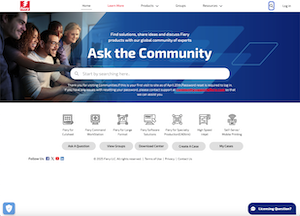
Fiery Communities also offers you additional great features:
- A searchable knowledge base of technical articles created by the Fiery Technical Support team, for solutions to common or known issues.
- The ability to “follow” topics that interest you, or on specific areas of focus.
- A personalised feed which is created dynamically, based on your previous activities on the site.
- The ability to select the “best” answer from multiple solutions.
- Mobile-friendly design.
- Fiery Licensing Assistant, an automated chat option designed to quickly help you with licensing-related questions.
Additional resources
Use this list of sales, training, and technical resources to help you broaden your knowledge of Fiery servers, plus related products and applications.
- Fiery servers
- Fiery Driven presses
- Fiery online resources
- Fiery how-to guides
- Free trials of Fiery software
- Fiery Command WorkStation main webpage
- Fiery Command WorkStation download
- Fiery print driver downloads
- Fiery Impose
- Fiery JobMaster
- Fiery Compose
- Fiery makeready solutions comparison
- Fiery ColorGuard
- Fiery Graphic Arts Pro Package
- Fiery ColorRight Package
- Fiery Automation Package
- Fiery JobFlow Pro
- Fiery FreeForm Create
- Fiery Scribe
- Training resources at Fiery Learning
- Fiery Communities
- Fiery online help
- World of Fiery newsletter