

 English (US)
 Português
 Deutsch
 Español
 Français
 Italiano
 日本 (日本語)
 中国大陆 (简体中文)
Your print room looks busy. But is it productive?

Imagine the end of a normal production day.
The printers were running. Operators stayed busy. Jobs moved through the shop. There was no major breakdown, no crisis that stopped production, and nothing that felt especially unusual.
It felt like a busy day. But was it a productive one?
That question is harder to answer than it sounds.
Production time rarely disappears in one dramatic event. More often, it slips away in small pieces: a few minutes waiting for the next job, a short interruption that gets fixed quickly, or a printer sitting idle while another carries most of the workload.
None of those moments feels particularly important while it is happening – but together, they can tell a very different story about a print operation’s productivity.
The day you remember vs. the day that actually happened
Every experienced production team develops a “feel” for the operation over time.
You know which days tend to be busiest, which printers seem to do the most work, where bottlenecks usually appear, and when something just doesn’t feel right.
That experience is certainly valuable – after all, each print room is its own living, breathing, dynamic organism with unique quirks and idiosyncrasies – but without consistent production information, experiential observations like “we were busy all day” can quickly become assumptions that don’t reflect what is really going on:
“That printer is always running.”
“We hardly had any downtime.”
“We need more capacity.”
“This week was better than last week.”
Any of those statements may feel true. But measurements and metrics might yield very different answers to the question of what actually happened on the print floor. And if those answers influence decisions about staffing, scheduling, workflow organization, or equipment purchases, then it becomes even more vital to verify what is actually happening with tangible data.
Busy is visible. Productivity is measurable.
A busy print floor creates a powerful impression: printers are running, operators are moving, and jobs are being completed. But activity and productivity are not the same thing – and might only be differentiable after recording enough performance data.
Consider this example: two printers may appear equally busy over the course of a shift. One, however, may have spent significantly more time producing, while the other accumulated short periods of idle time or repeated interruptions.
While a major failure is obvious, ten minutes of idle time usually isn’t. Neither is a short interruption that an operator fixes immediately.
This is what makes small losses from nearly invisible inefficiencies difficult to understand: large problems announce themselves. Small ones become part of the routine.
Four questions that reveal more than “Were we busy?”
A useful way to understand production performance is to ask four simple questions:
What happened?
Start with the event itself. Did a printer stop? What were the consequences? Did production come to a halt, or did the work shift from one printer to another? Understanding these events is the foundation of production downtime tracking.
How often does it happen?
A one-off event may not matter much. But if the issue is something that happens every day, it probably represents an underlying issue that deserves more attentionand may indicate recurring manufacturing downtime.
How much does it add up to?
Five minutes sounds insignificant. Five minutes several times a day across multiple printers adds up quickly.
What can we change?
Not every interruption can or should be eliminated. The useful question is whether a recurring pattern points to something that can be improved: scheduling, workload distribution, job preparation, operator processes, maintenance, or something else.
That progression — event, frequency, impact, action — helps separate noise from problems worth solving. And that leads to better questions:
“Is one printer consistently carrying more of the workload than another?”
“Are the same interruptions happening repeatedly?”
“Are certain periods of the day less productive?”
“Did production actually improve this month, or did it simply feel busier?”
“Where is capacity available that nobody is noticing?”
These are questions that might be hard to notice in the moment but become clear once you add up the data.

Turning everyday production into information you can use
Of course, manually reconstructing production every day quickly becomes impractical, especially as the number of jobs and printer grows.
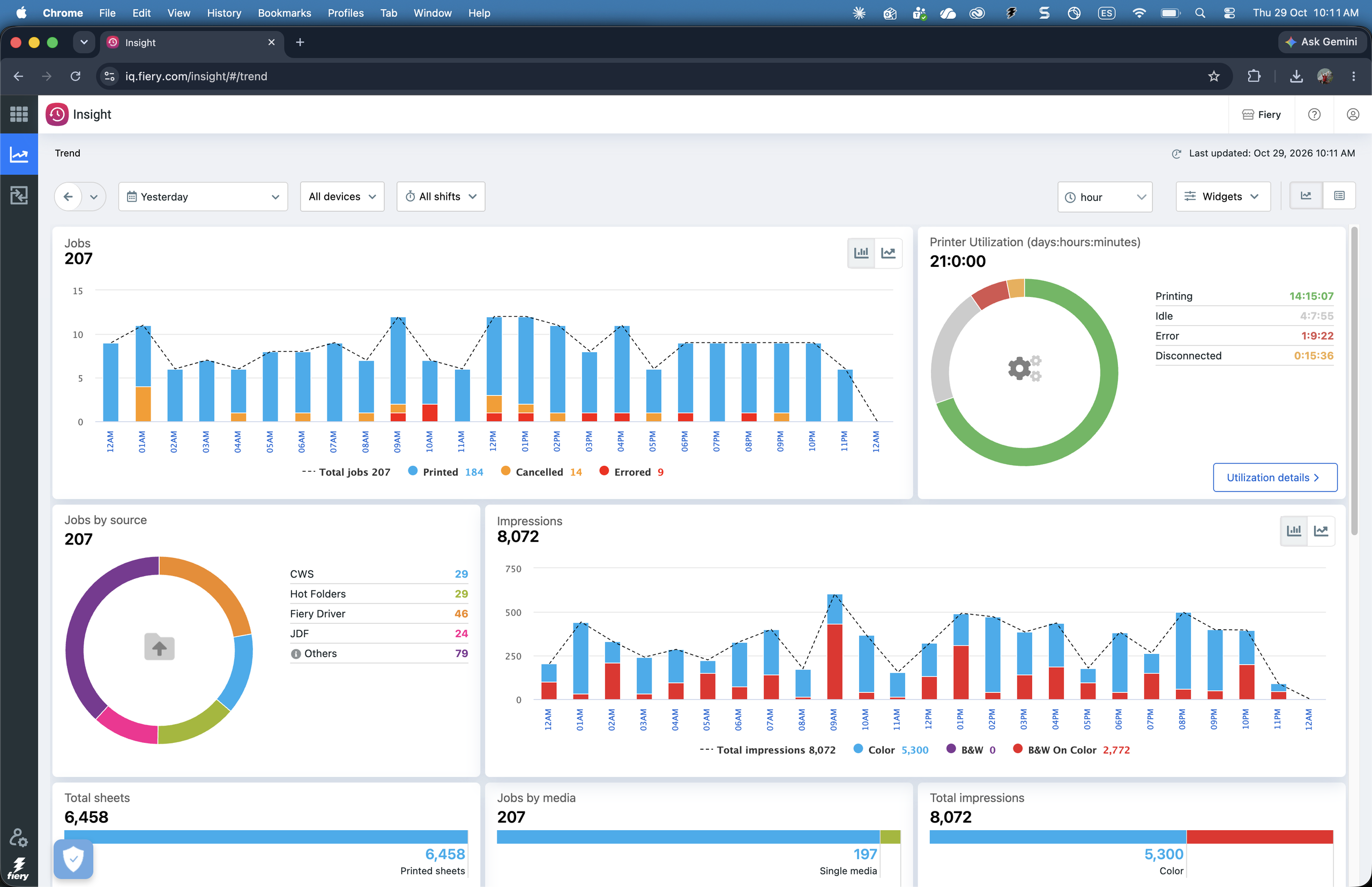
Fiery IQ – Fiery’s cloud-based data analytics suite that comes free with all Fiery cutsheet servers – automatically collects production information from Fiery Driven™ printers, allowing teams to see production metrics, printer readiness, and historical information to understand how performance varies over time.
Within Fiery IQ, the Fiery Dashboard provides a near-real-time view of key production information and printer status, while Fiery Insight adds the historical view: tracking trends, comparing printers, reviewing utilization, and investigating the patterns behind lower utilization or production-blocking events.
That historical context is important because an individual number rarely tells the whole story, but tangible metrics and data show clear patterns emerging over time – helping you learn what’s really going on with your production line.
There is no single number for a “good” production day
It’s important to remember that healthy metrics for one print operation may make little sense for another.
Job mix can vary. Equipment is different. Shift patterns are different. Some printers perform specialized work while others carry a much broader production load.
So rather than chasing an abstract target, Fiery IQ gives you the data and the tools to answer a more useful question:
Are we improving compared with where we were before?
Whether it’s reduced down time, less frequent interruptions, more efficient distribution of work across printers, or fewer workflow bottlenecks, robust production data makes it possible to establish your own baseline and then see whether changes in the operation are actually moving performance in the right direction.
From identifying historical trends around a specific time of year to finally homing in on the one machine that keeps holding up your production line, Fiery IQ’s metrics dashboard becomes more than a collection of numbers: it tells you what is actually happening in your print room, and where you can make the biggest impact to improve your operation.
Fiery IQ is included at no additional cost with all Fiery servers driving cutsheet printers. Fiery users can get started by creating an account at iq.fiery.com and connecting their Fiery servers to access production insights and gain a clearer picture of their production performance, or learn more at our Fiery IQ product page.